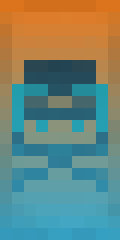
Shield
Author Tajine1x
Tajine1xPosted onOctober 19, 2026 · about last week
Views33
DescriptionA cyan Snout with a black skull on a light blue gradient, another of the seven helmeted shields. Needs Minecraft 1.16 or newer, and it is the coldest looking of the set. The black skull under the cyan Snout is what fills the helmet.
Votes
Give command
All versions
1.16 – 1.20
/give @p minecraft:shield{BlockEntityTag:{Base:1,Patterns:[{Pattern:"pig",Color:9},{Pattern:"sku",Color:15},{Pattern:"gru",Color:3}]}}1.21+
/give @p minecraft:shield[base_color="orange",banner_patterns=[{pattern:"minecraft:piglin",color:"cyan"},{pattern:"minecraft:skull",color:"black"},{pattern:"minecraft:gradient_up",color:"light_blue"}]]Pattern layers (3 layers)
- Base — Orange
- 1. Snout — Cyan
- 2. Skull Charge — Black
- 3. Base Gradient — Light Blue
Crafting recipe
Works in 1.16 – 1.20, 1.21+. This design is not craftable in 1.8 – 1.13, so there is no crafting table recipe.
BBlank banner: 6 wool + stickOrange wool
1SnoutCyan dye
Snout
2Skull ChargeBlack dye
3Base GradientLight Blue dye
SShield: finished banner + shield
More by Tajine1x
All shields by Tajine1xSimilar shields
How to Apply This Banner to a Shield
In Minecraft Java Edition, craft the underlying banner using the loom recipe above. Then, place a blank wooden shield and the crafted banner together in any crafting grid. The shield will inherit the banner's pattern. Need a shield first? See how to make a shield in Minecraft.
To summon the decorated shield directly using commands, select your Minecraft version in the command panel above and click Copy Command.
Comments (0)
Log in or sign up to comment.